
Built by an educator, for educators
Grade Python assignments
automatically.
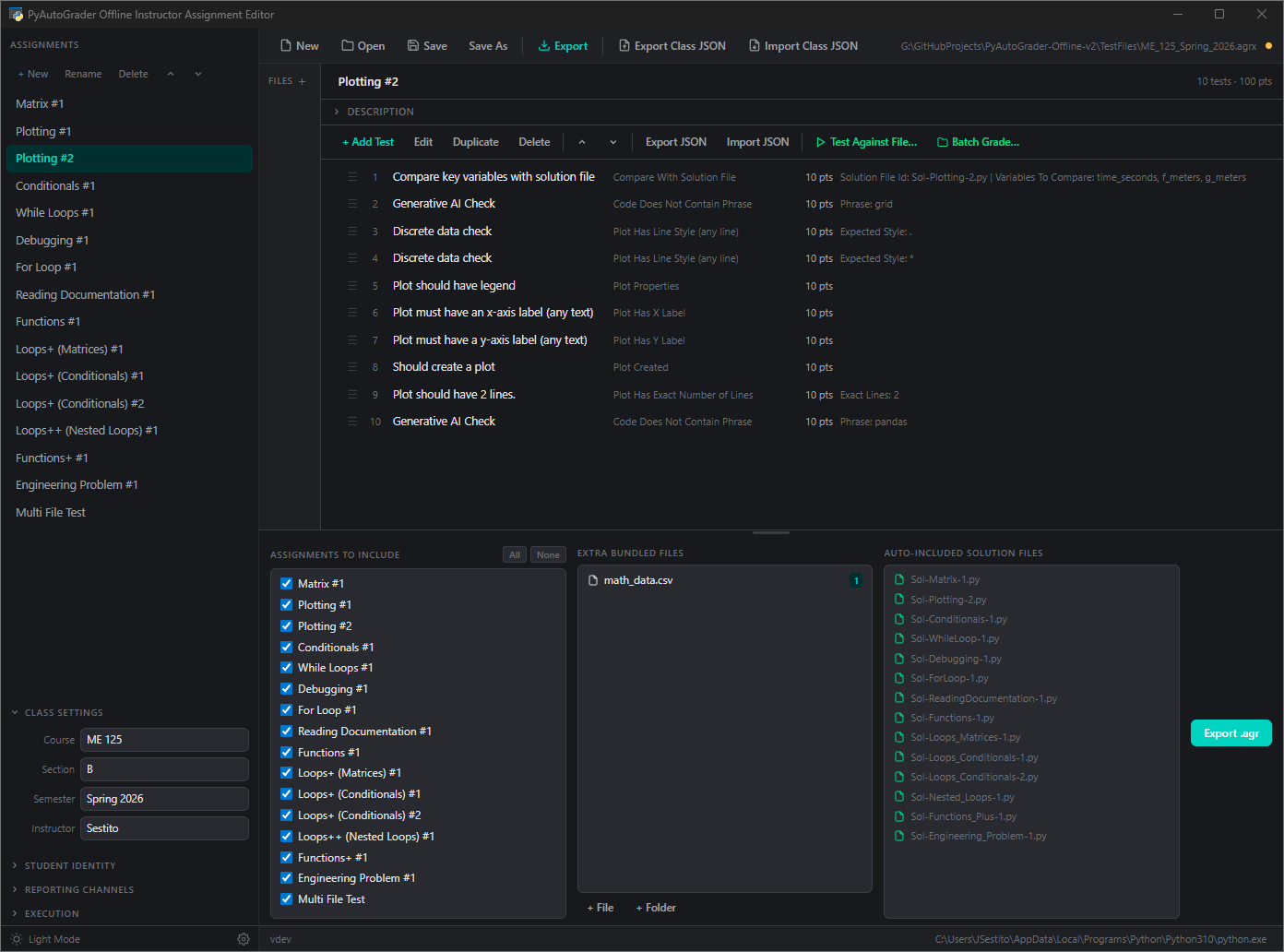
Create assignments with 60+ test types. Distribute a single file. Students grade on their own machines. Collect results your way.
# Running test suite...
def quadratic(x, a, b, c):
    result = a * x**2 + b * x + c
    return result

✓ Verify Function Name   PASS
✓ Test Function #1       PASS
✓ Test Function #2       PASS

Score: 100/100  3 tests passed
How It Works
From assignment creation to grade collection in four steps
Create
Build assignments with tests, solutions, and rubrics in the instructor application
Distribute
Export an encrypted .agr file and share it through your LMS or email
Students Grade
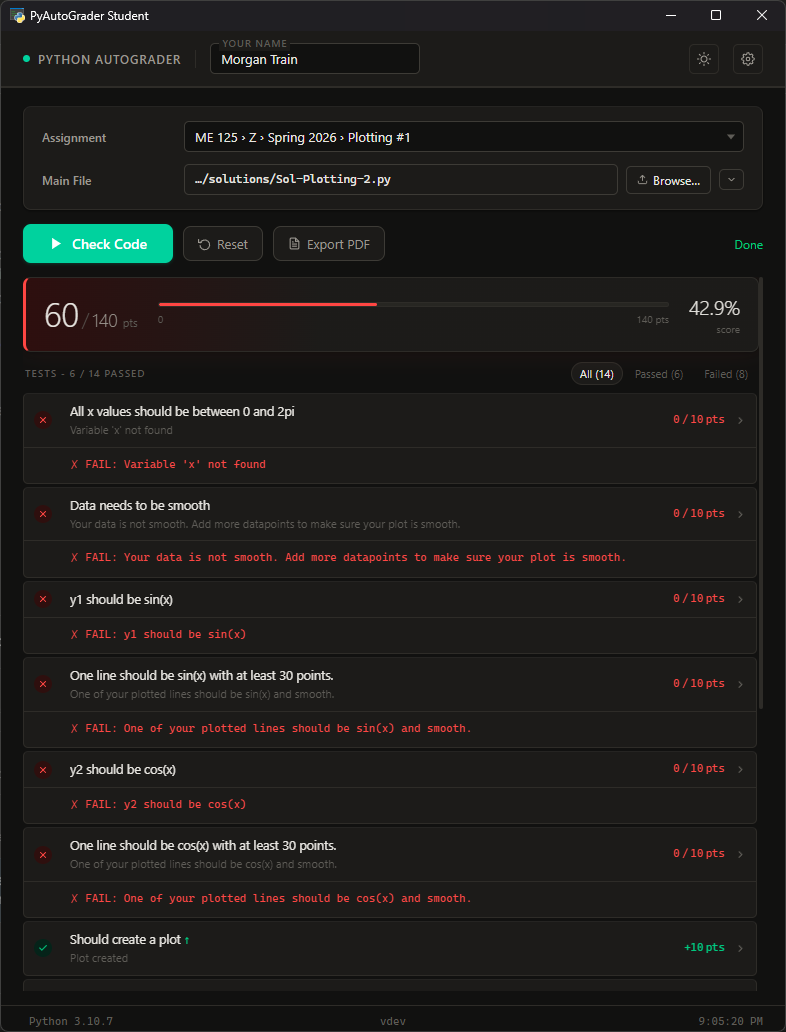
Students run the grader on their machine - instant feedback, unlimited attempts
Collect Results
Receive grades via PDF export, email notifications, Google Sheets, or your self-hosted server

Why PyAutoGrader?
Runs on Student Machines
Students learn real skills - setting up Python, installing packages, running code locally. No cloud dependency.
Your Data, Your Control
FERPA-friendly by design. Grading runs locally. The self-hosted server keeps data on your infrastructure - not ours.
| Criteria | PyAutoGrader | Paid autograders |
|---|---|---|
| Cost | Pass Free forever. No per-student or per-course fees. | Fail Subscription or per-student pricing. |
| Data location | Pass Your infrastructure. Local machines and your own server. | Fail Vendor's cloud. Data processing agreement required. |
| Works offline | Pass Students grade without internet. Results queue automatically. | Fail Internet required to submit. |
| Deployment | Pass Self-hosted or fully local. No vendor lock-in. | Fail Vendor-hosted only. |
| Test types | Pass 60+ built-in. Functions, plots, code quality, performance, more. | Fail Varies by platform. |
Collect Results Your Way
Mix and match channels. Offline submissions are queued and sent automatically when internet returns.
📄 PDF Export
Students export a formatted PDF with scores and code, then upload to your LMS. Works completely offline - no internet needed.
🖥️ Self-Hosted Server
Students submit results to your Flask server. Full dashboard with analytics, plagiarism detection, code search, Canvas export, and roster management.
Instructors can restrict grading if not connected and submitted to server.Results emailed to you automatically in the background. HTML-formatted with syntax-highlighted code and styled pass/fail results. Queued if offline.
📊 Google Sheets
Grades silently posted to your spreadsheet via webhook. Instant gradebook - no student action needed. Queued if offline.
60+ Built-In Test Types
From basic variable checks to cyclomatic complexity analysis - test what matters
Variables & Data
Values, types, lists, arrays, dicts, DataFrames, solution comparison
Functions & Classes
Existence, signatures, call detection, solution testing, methods, attributes
Control Flow
Loop detection, iteration counts, if statements, exception handling
Matplotlib Plots
13 plot tests - labels, data points, line styles, widths, markers, solution comparison
Code Quality
Naming conventions, docstrings, complexity, nesting depth, line length, imports
Performance
Timed execution, solution speed comparison, script and function benchmarks
Self-Hosted Submission Server
A full-featured Flask server you run on your own infrastructure - HTTP or HTTPS
📊 Analytics
Score distributions, submission trends, assignment difficulty, student progress, and at-risk identification
🔍 Plagiarism Detection
Pairwise code similarity with side-by-side diff view. Color-coded severity scores.
📋 Roster & Deadlines
Manage rosters, set assignment deadlines, and configure per-student overrides
📤 Export
Canvas-compatible CSV export, code search across all submissions, submission browser
Flexible Student Identity
Use a roster for verified names, or let students enter their own - your choice per assignment
Free-Form Names
Students type their name. No roster needed. Simple and fast for small classes or informal use.
Roster Validation
Embed a CSV roster in the assignment file, pull from Google Sheets, or fetch from your server. Students must match a valid entry.
Username with Fallback
Try roster lookup first, fall back to free-form if not found. Flexible for late adds or cross-listed sections.
Batch Grade from Your LMS
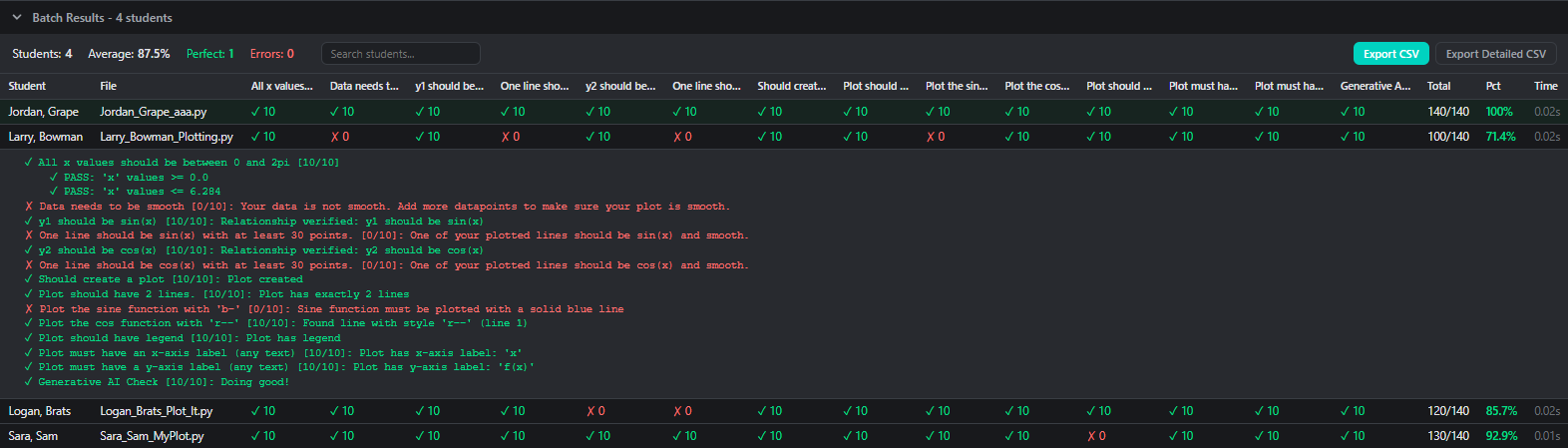
Download student Python files from your LMS, then grade them all at once through the instructor application
1. Download
Collect .py files from your LMS
2. Grade
Run batch grading in the instructor app
3. Export
Get a CSV with per-test scores and percentages
Free. Always.
No subscriptions. No per-student fees. No premium tiers.
Built by an educator who was tired of expensive tools.
Ready to Get Started?
Download PyAutoGrader for free. Windows, macOS, and Linux.